


One Unified Platform for spend management and proactive control

Expense Manager

AP Manager

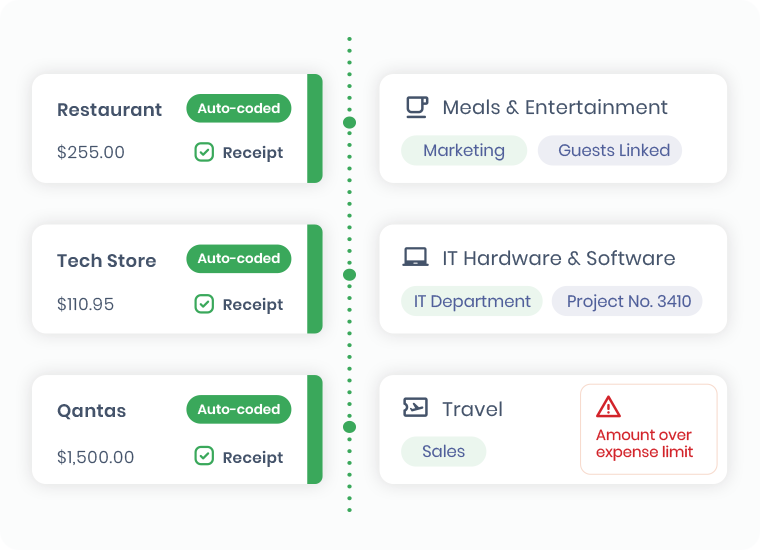
Expenses on auto-pilot

No data entry, receipt matching and auto coding puts your expense claims on auto pilot

ProSpend_2b

The Smart Way to Manage Employee Expenses

Free up your valuable resources for higher-impact work.  With ProSpend's advanced expense management solution, everyone in your organisation benefits from quicker claim creation, faster approvals and fewer errors.

expense page header image
ProSpend_Footer_Icon_3

Over 1,000 customers trust us since 2015

ProSpend_Footer_Icon_1

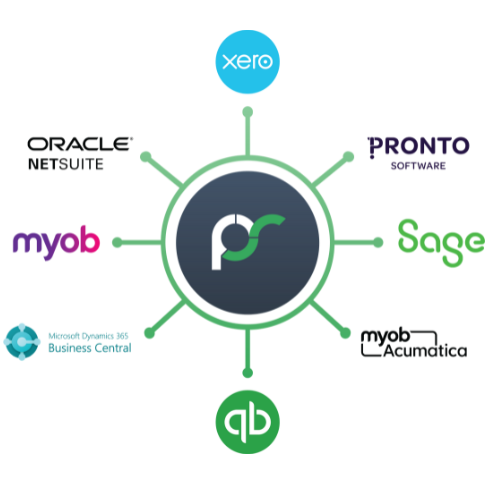
Integrations with 30+ leading ANZ ERPs

ProSpend_Footer_Icon_4

Dedicated implementation and local support

ProSpend_Footer_Icon_2

MYOB Innovative App of the year finalist

Free your team from manual expense management

✅  Corporate, business and virtual cards   ✅  Receipt scanning and smart match   ✅  Multi-level approval workflows   ✅  Track FBT 

Ready to see how it works

Check out the video now!

claim product mock 1200 x 800

Credit card reconciliation

ProSpend integrates with all major Credit Card issuers for daily data feeds that automatically create expense claims, with auto-coding and smart matching of receipts.   

For companies that do not have ‘corporate’ cards, we offer a Business Card upload module with a smart coding function. Users can import their Personal credit card statements directly into a cash claim instead of manually creating expense lines.

friends (1)

Claims that build themselves

With credit card data being received daily credit card claims are built for your employees. 

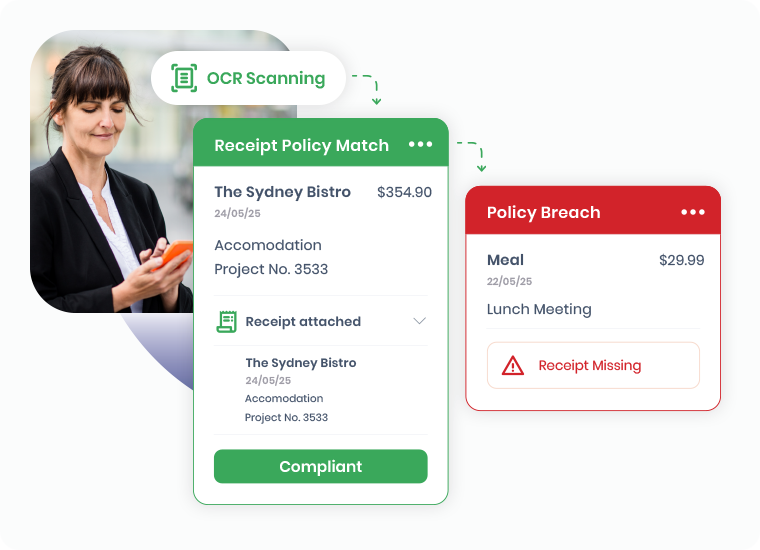
Transactions are instantly coded to the correct accounts, eliminating errors, while our smart technology matches receipts to the right purchases.

It is fast and accurate and lets your employees get on with their valuable tasks. 

billini (4)


taxi receipt (2)
new reimbursement3

Quick reimbursements

Claiming back out-of-pocket expenses should be quick and simple. Our easy to use mobile app lets your employees submit a reimbursement claim in just a few clicks.

Snap a receipt, add in the details and submit for approval.

mileage2 (1)

Track mileage accurately

Our integration with Google Maps tracks the mileage and the reimbursement is calculated automatically using the company defined mileage reimbursement rate.

The map image is saved for your users as the receipt.

split expense

Powerful split feature

Dynamic split functionality allows users to split their expenses across multiple data points, including cost centre, G/L codes, GST, personal and more.

Users can launch any number of saved favourite splits to save time and errors.

add recipient

Claim GST/FBT accurately

No more confusion for your finance team.  Configurable FBT and tax wizards handle all options for Australia, New Zealand and global tax systems.

Track and report on FBT using the 50/50 or actual method and configure GST edit options for expense types.

Explore all the features of Expense Manager

TESTIMONIALS

What our customers say

The smartest and most efficient way to manage your spend.

Friends School logo

“use of the mobile application makes it easy for our staff to capture and code documentation on the go”

NSWNMA logo

expensemanager (now ProSpend) was able to totally automate reimbursements for our staff for fuel expenditure, corporate and personal expenses

Baskin Robbins logo

“It has reduced a lot of time on cash claims....the approval time and the time to actually get the money reimbursed to employees ”

What our customers say

Join these modern finance teams that trust ProSpend to automate their business spend.

nswnma (1)
NSW Nurses & Midwives Assoc

As a not for profit organisation we are audited every year and a critical need for us is the ability to track who spent what, where and why and ProSpend delivers this.

NSWNMW's Story
baskin robbins (1)
Baskin Robbins

The flexibility of the approval workflows for expenses and the accountability that ProSpend gives our business is just one of the features we value.

Baskin Robbin's Story
bto (5)
The Breakthrough Office

With its seamless integration to Xero, ProSpend has significantly reduced the time and cost on processing and reconciling our expenses & invoices.

BTO's Story
friends school (1)
Friends School

ProSpend assists us to more efficiently administer corporate cards with a daily data feed, and the mobile makes it easy  to capture receipts and code on the go. 

Friends School Story
budgets

Visible budgets means proactive spend

Whether it is expenses, invoices or pre-spend with purchase orders our Budget Module gives employees visibility so they can make sensible and smart decisions:

✅ Easy to set up and manage
✅ Track spend against budgets in real time
✅ No more hidden spreadsheets


artrage (1)

One platform for all your business spend

Easily manage your expenses, invoices, purchase orders and cards all in one unified platform

FAQ

Need clarification?

What is an expense management system?

Why is expense management important for Australian businesses?

How does ProSpend’s Expense Manager work day to day?

Can staff submit and approve claims from their mobile?

Does ProSpend support both reimbursements and corporate card expenses?

How does expense automation work with Xero, MYOB and NetSuite?

Is ProSpend suitable for multi-entity organisations?

Absolutely. ProSpend supports multi-entity and group structures, shared services teams and different policies or approval rules per entity. This makes it well suited to not-for-profits, education, franchises, groups and organisations that manage multiple ABNs or business units.

How does ProSpend help with FBT on corporate card expenses in Australia?

Fringe Benefits Tax (FBT) may apply to certain corporate card expenses, such as entertainment or staff functions. To calculate FBT, organisations need accurate classification of each transaction, clear business purpose and an appropriate calculation method. ProSpend helps by capturing receipts, tracking attendees and coding expenses so finance teams have the data they need to calculate FBT correctly.

What is the difference between the FBT actual method and the 50/50 method?

What records do Australian businesses need for FBT compliance?

The ATO expects clear records of expenditure, receipts, business purpose, attendees (where relevant), dates and approvals. ProSpend stores this information alongside each expense, creating a searchable, audit-ready history that supports your FBT return and any review.

How do virtual corporate cards work for staff travel in ProSpend?

Virtual cards are digital card numbers issued for a specific trip, project or supplier. You can set limits, expiry dates and controls, and staff use them like a normal card for flights, accommodation or other travel costs. Transactions feed into ProSpend, where receipts are attached and expenses are approved against your policy.

How does ProSpend help reduce card and expense fraud risk?

ProSpend supports card controls such as transaction limits and merchant restrictions, along with real-time visibility of spend. Combined with receipt matching, approvals and policy enforcement, this reduces the risk of unauthorised use and makes unusual activity easier to spot quickly.

What does the employee reimbursement process look like with ProSpend?

Employees capture receipts and submit claims with a short explanation of the business purpose. Managers review and approve, and finance exports approved claims to the payroll or banking system for payment. ProSpend automates coding, tax treatment and approvals so reimbursements are accurate, consistent and easy to audit.

How does ProSpend compare to Lightyear for expense management?

Lightyear is primarily focused on AP automation, with expenses as part of a broader payables workflow. ProSpend provides a unified spend management platform across expenses, AP, purchase orders, cards and travel, with strong support for ANZ tax requirements and multi-entity structures. Organisations that want both expense control and broader spend visibility typically choose ProSpend as their central platform.

How does ProSpend compare to Concur for expense management?

SAP Concur is a global travel and expense platform often used by very large enterprises. ProSpend offers a more locally focused alternative, with ANZ data hosting, GST/FBT awareness, simpler implementation and responsive local support. It suits organisations that want powerful control and automation without the heavy configuration and overhead of a global enterprise system.

What onboarding support does ProSpend provide?

ProSpend provides implementation support, including configuration of entities, approval workflows, cost centres and tax rules, as well as integrations with your finance and payroll systems. Training and ongoing support are included so your team can adopt the platform quickly and confidently.