One Unified Platform for spend management and proactive control

Expense Manager

AP Manager

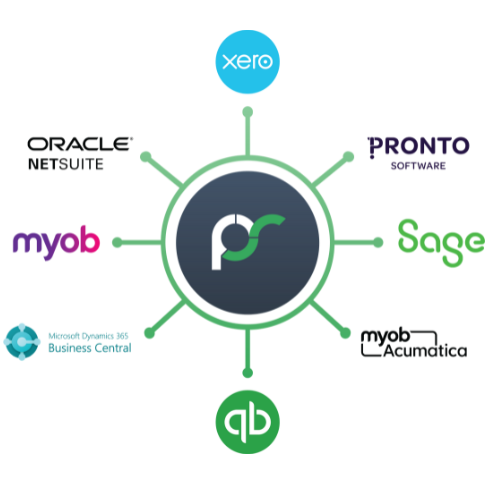
We integrate with all tools that matter

Your pain? We understand. This is why we do what we do, and can provide you with an experience like no other.

We integrate with all tools that matter

Your pain? We understand. This is why we do what we do, and can provide you with an experience like no other.

Integrations-2

Already a partner? Log in to the Partner Hub for resources and updates.

Built for your finance team

Regardless of how complex the data feed or the finance system is,

ProSpend ensures the data is shared accurately, securely and effortlessly.


MYOB Acumatica

Learn More

MYOB AccountRight Live

Learn More

MYOB EXO

Learn More

Business Central

Learn More

Xero

Learn More

Sage Intacct

Learn More

Sage 300

Learn More

Pronto

Learn More

NetSuite

Learn More

Reckon

Learn More

Wiise

Learn More

Microsoft Dynamics GP

Learn More

SAP (B1, Business ByDesign)

Learn More

QuickBooks Online

Learn More

Sybiz

Learn More

Dynamics AX

Learn More

Dynamics 365 Finance and Operations

Oracle

Epicor

FinancialForce

CMS Transport System

JD Edwards

Maze

Microsoft Navision


SUN Systems

Learn More

Synergetic Management System

SysPro

Technology One
Tencia

Learn More

Accentis

Apparel21

Attache

ProSpend_Footer_Icon_3

Over 1,000 customers trust us since 2015

ProSpend_Footer_Icon_1

Integrations with 30+ leading ANZ ERPs

ProSpend_Footer_Icon_4

Dedicated implementation and local support

ProSpend_Footer_Icon_2

MYOB Innovative App of the year finalist

Frequently Asked Questions

What does ProSpend integrate with?

ProSpend integrates with major ANZ accounting and ERP systems including Xero, MYOB, NetSuite, Business Central and Acumatica. It also connects with bank feeds, card providers and eInvoicing via the Peppol network. These integrations ensure spend flows cleanly from capture to approval to ledger.

Why are integrations important for spend management?

Integrations remove manual data entry, reduce coding errors and ensure consistent tax treatment. They also provide real-time visibility of budgets and approvals across entities. For ANZ teams, integrations help maintain audit readiness and reduce reconciliation time.

Do we need IT support to manage integrations?

Generally no. ProSpend’s integrations are designed for finance teams to manage with light support during implementation. IT involvement is usually minimal unless your organisation has custom security or hosting requirements.

How does ProSpend integrate with Xero?

ProSpend syncs chart of accounts, tracking categories and tax codes, then exports approved invoices, expenses, POs and card transactions directly into Xero. Multi-entity groups using multiple Xero files can manage all spend in one ProSpend instance. Budgets and GST treatment remain consistent.

Does ProSpend integrate with MYOB?

Yes. ProSpend syncs suppliers, accounts, job codes and tax settings from MYOB AccountRight or MYOB Advanced. Approved transactions export with the right coding and entity mapping, helping shared-services teams avoid double entry.

How does ProSpend connect with NetSuite, Business Central and Acumatica?

ProSpend integrates via secure APIs, syncing GL codes, dimensions, departments and entities. Approved transactions flow into the ERP with clean GST and FBT categorisation. This is ideal for mid-market and multi-entity organisations with complex coding structures.

Which card feeds does ProSpend support?

ProSpend connects with Amex, Visa, Mastercard and bank-issued corporate cards. Card feeds sync automatically, allowing staff to attach receipts, code transactions and submit claims in real time.

Does ProSpend support virtual card integrations?

Yes. ProSpend’s own virtual cards integrate directly into expenses, budgets and approvals. This gives finance teams full visibility from payment to reconciliation.

How does ProSpend support eInvoicing through the Peppol network?

ProSpend receives Peppol eInvoices directly into the invoice inbox with structured, validated data. This reduces fraud risk, improves GST accuracy and eliminates most manual entry.

Can ProSpend handle integrations for multiple entities or ABNs?

Absolutely. Each entity can connect to its own ledger while sharing a consolidated spend workflow. This is valuable for groups managing multiple Xero files, MYOB entities or NetSuite subsidiaries.

How do approvals and budgets align with ERP integrations?

 Approvals, budget rules and coding are applied before export, ensuring financial data lands in your ERP cleanly. This reduces rework and maintains consistent reporting across departments and entities.

Do integrations support project codes, cost centres and departments?

Yes. ProSpend syncs dimensions from your ERP so users select the correct project, cost centre or job during submission. This keeps project-based reporting accurate.

How long does it take to set up integrations?

Most ERP connections are configured within the first few weeks of implementation. Full go-live for AP, POs, budgets and expenses typically occurs within 4–10 weeks depending on complexity.

How secure are ProSpend integrations?

Data is transferred via encrypted API connections and hosted in Australian data centres. This supports organisations with strict compliance requirements, including councils, NFPs and government-funded entities.

How does ProSpend compare to Concur, Lightyear, Weel or Airwallex for integrations?

ProSpend offers deeper multi-entity logic and stronger ERP connections, especially for Xero, MYOB and mid-market ERPs. Many ANZ organisations adopt ProSpend when global or lightweight tools lack robust ledger integration.

What happens if we change ERP or accounting systems?

ProSpend can be reconnected to your new ERP, with budgets, approvals, suppliers and workflows retained. This futureproofs your spend management setup.

ProSpend_Integrations_3
MORE INTEGRATIONS

Didn't find your ERP?

Contact us to learn more about how we can support your current system.