


One Unified Platform for spend management and proactive control

Expense Manager

AP Manager

Expense Manager

The Smarter Way to Manage Employee Expenses

Built for ANZ mid-sized finance teams, ProSpend's expense management software replaces spreadsheets with real-time spend visibility, mobile capture and approvals, and stronger FBT/GST compliance without losing control.

em_hero

Trusted by ANZ finance teams

 Join 1,000+ Australian and New Zealand organisations that trust ProSpend, including RSL NSW, Monash College, Baskin‑Robbins, The Friend’s School, and more. 

  • Friends School
  • Monash College
  • ASPA-Loop-700px-1
  • Kempsey Adventist School
  • Macquarie University
  • Port Macquarie Adventist School
  • ProSpend Website Logo Carousel - Stakeholder Logos
  • University of Queensland

Why mid-market ANZ finance teams choose ProSpend's expense management software

One platform for all spend

Expenses, AP invoices, purchase orders, corporate cards, and travel in one system for a complete view of business spend.

Fast mobile approvals

Managers approve or query in seconds via mobile or email so every action is timestamped and visible to finance.

Corporate card reconciliation, daily

Match transactions to receipts, flag missing receipts early, and reduce month-end scramble.

GST & FBT-ready workflows

Capture the context and evidence finance teams typically need to handle GST and FBT consistently.

Seamless multi-entity control

Manage multiple entities with entity-specific policies and consolidated reporting.

Integrates with your finance stack

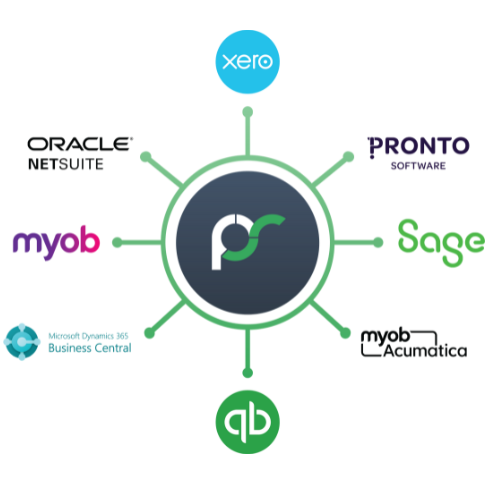
Built for Xero, MYOB, NetSuite, Dynamics 365 Business Central, Acumatica and more. Approved expenses sync with coding + attachments.

Still doing expense reports in spreadsheets and chasing receipts?

Manual expense reports and spreadsheet claims create the same pain every month: late receipts, slow approvals, inconsistent coding, and stress at month-end and audit time. Employees dread the admin, managers delay approvals, and finance ends up chasing missing information.

With ProSpend, you can finally break this cycle:

cut processing

Cut processing time by removing re-keying and manual routing

speed up approvals

Speed up approvals and reimbursements with mobile-first workflows

red tape

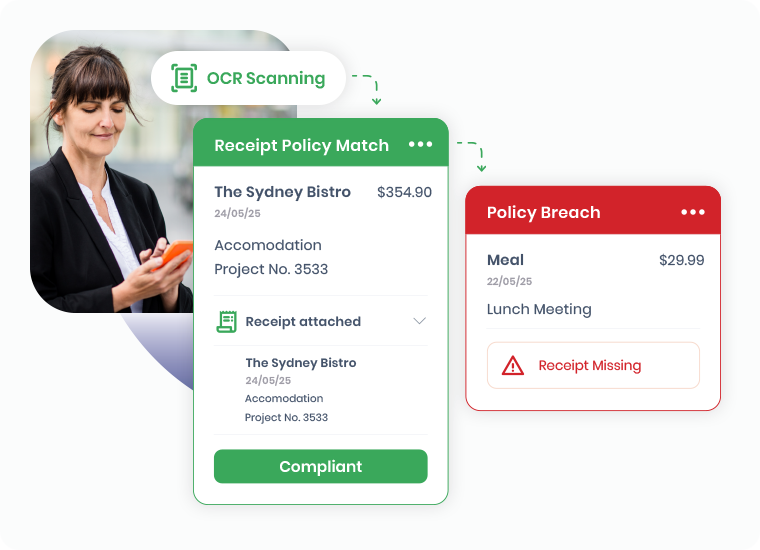
Enforce policy automatically (missing receipts, exceptions, out-of-policy spend)

spend-1

See spend in real time before reimbursement and before posting

Experience it visually

See how ProSpend transforms business expense management from piles of paper to a streamlined digital process.

em_process_final

Features

What does the ProSpend Expense Manager do for you?

Built to fit your finance processes, ProSpend's expense management software streamlines business expenses securely, efficiently, and at scale.

Expense-Manager_Receipt-capture

Keep every expense audit-ready by default

Stop the back and forth for missing receipts and unclear spend. Employees can snap a receipt, add the details and submit in a few clicks, while ProSpend keeps the evidence attached from day one for audit ready records.

  • Mobile receipt capture (iOS/Android) plus web upload
  • OCR receipt capture to reduce manual entry and rework

Stop chasing card receipts at month-end

Bring corporate card spend and receipts into one workflow. ProSpend imports daily card feeds where enabled, matches receipts to transactions, and flags missing receipts or exceptions early so month end close is smoother.

  • Daily transaction feeds (provider dependent)
  • Smart matching of receipts plus exception queues
  • Missing receipts and out-of-policy flags
Expense-Manager_daily-expenses
Expense-Manager_Auto-coding-1

Expense claims that build themselves

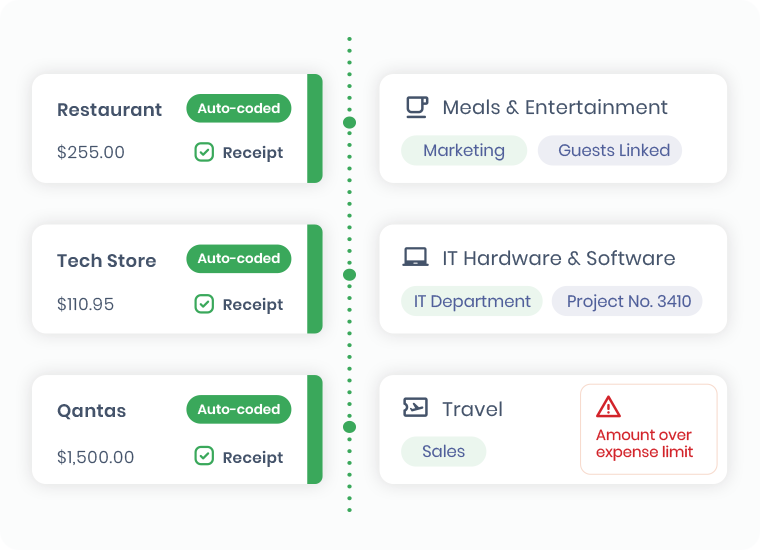
Reduce admin for employees and reduce clean up for finance. With card data arriving daily, claims can be created automatically with consistent coding, so reporting is cleaner and finance focuses on exceptions instead of building expense lines.

  • Auto-assembled claims from receipts and card transactions
  • Standardised fields for reporting
  • Finance focuses on exceptions, not compiling reports

Track mileage and allocate costs without spreadsheets 

Make mileage and allocations consistent without manual spreadsheets. Google Maps mileage is captured and reimbursements are calculated using your company rate, while split coding allocates one expense across projects, cost centres, or entities. The map image is saved as supporting evidence.

  • Mileage support with mapping and automatic reimbursement calculation
  • Split coding across projects, cost centres, and entities
  • Save favourite splits for repeat expenses
Expense-Manager_Mileage
Expense-Manager_Approvals

Keep approvals moving without bottlenecks

Keep expenses moving through approvals without chasing managers. Route approvals by amount, department, project, or entity, and let managers approve or query via mobile or email. Every step is recorded with a clear audit trail of actions and comments.

  • Multi-level approvals by amount, entity, department, and project
  • Approve or query via mobile or email
  • Timestamped audit history and comments

Stay compliant with GST and FBT 

Reduce end of month tax clean up by capturing the GST and FBT details finance needs when expenses are submitted, including entertainment context.

Use configurable tax and FBT wizards for AU and NZ, track FBT using the 50/50 or actual method, and set GST edit controls by expense type for consistent treatment.

  • Entertainment context prompts to reduce FBT follow ups
  • 50/50 or actual FBT methods, plus reporting support
  • GST edit controls by expense type for consistent handling
Expense-Manager_Entertainment_FBT_1

#

customers

Over 1,000 customers trust us since 2015

ER Integration

Integrations with 30+ leading ANZ ERPs

placeholder_female professional

Dedicated implementation and local support

myob

MYOB Innovative App of the Year Finalist

FAQs

Expense Management Software

What is an expense management software?

 An expense management software helps employees capture receipts, submit claims, route approvals and export approved expenses to finance with a complete audit trail.

How does ProSpend's expense management software work day-to-day?

ProSpend Expense Manager supports business expense management with mobile and web receipt capture, rules-based approvals, and approved expense data exported to your ERP with coding, tax treatment and attachments.

Compliance and controls (ANZ)

How does ProSpend support GST compliant expense claims?

It standardises key fields and retains receipts and approvals at line level to support consistent handling and audit readiness.

How does ProSpend help with FBT-related entertainment expenses?

It can prompt for contextual details finance teams typically need (such as purpose/attendees) and keeps them with receipts and approvals to reduce follow-ups. (High-level only.)


Workflow and features

Does ProSpend support corporate card reconciliation?

 Yes. Where enabled, transactions can be imported regularly, matched to receipts, coded consistently, and exceptions (missing receipts/out-of-policy) flagged early. 

Can we set multi-level approvals and policy rules?

Yes. Approvals can route by amount, entity, department, project and thresholds aligned to your policy.

Integrations and rollout

Does ProSpend integrate with Xero, MYOB, NetSuite or Dynamics 365 Business Central?

Yes. Approved expenses sync to your finance system with GL coding, tax treatment and attachments, reducing re-keying and errors. See all our integrations here.


How long does implementation take?

 It depends on entities, workflows and integrations, but implementations are typically delivered in weeks with local onboarding and support. 

Ready to see it in action?

Take control of business expenses without adding headcount.

  • Expense management software that is built for ANZ finance teams
  • Integrates with your ERP (Xero, MYOB, NetSuite, Business Central and more)
  • Supported by local experts
em_cta_1