







One Unified Platform for spend management and proactive control

Expense Manager

AP Manager

ProSpend + Pronto Xi

Pronto Xi Integration Built for ANZ Finance Teams

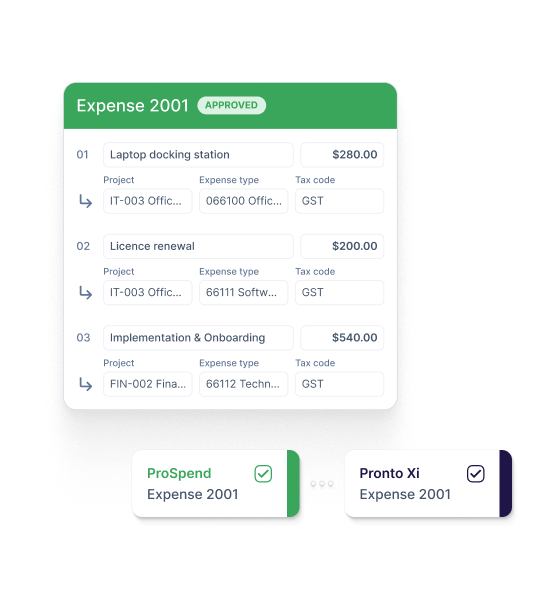
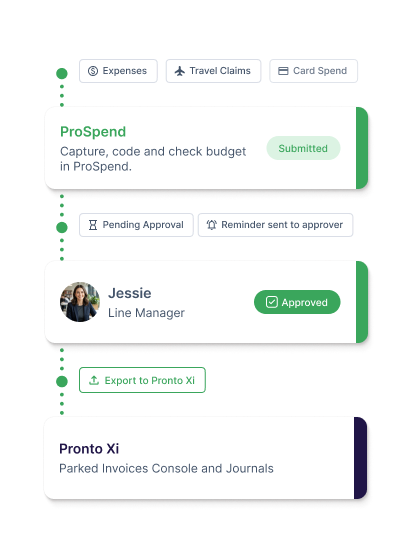
Capture, code and approve expense claims, card spend and travel manager claims in ProSpend before approved data is exported into Pronto Xi.

pronto-header
ProSpend + Xero

Xero Integration Built for Australian Finance Teams

Purpose-built spend management that sits in front of Xero - so every transaction arrives approved, coded, and audit-ready.

xero_hero_1

Trusted by ANZ finance teams

  • Friends School
  • Monash College
  • ASPA-Loop-700px-1
  • Kempsey Adventist School
  • Macquarie University
  • Port Macquarie Adventist School
  • ProSpend Website Logo Carousel - Stakeholder Logos
  • University of Queensland

What you get with Pronto Xi and ProSpend.

Finance teams lose up to 11 hours a week to manual expense admin. Use the ProSpend Pronto Xi integration to capture, code and approve expense claims, card transactions and travel manager claims before they reach your ERP. Employees submit claims with receipts attached in ProSpend, and finance teams apply the right Pronto Xi coding before approved data is exported.

search_insights_48dp_FFF_FILL0_wght400_GRAD0_opsz48

Get visibility before spend reaches Pronto Xi

Capture receipts, coding and approvals in ProSpend before transactions are exported to Pronto Xi. Finance gets the supporting detail earlier and spends less time chasing missing information.

bolt_boost_48dp_44546A_FILL0_wght400_GRAD0_opsz48

Keep Pronto Xi coding consistent

Apply GL accounts, cost centres, departments and project coding in ProSpend. Set up your coding structure during implementation, and sync projects and project groups directly from Pronto Xi for project-related spend.

data_check_48dp_FFF_FILL0_wght400_GRAD0_opsz48

Connect through one-click API or standard file export

Connect to Pronto Xi via one-click API for version 740 and above. API customers can trigger export automatically on approval or finalisation. Earlier versions use a standard file your team uploads directly into Pronto Xi.


Bring Your Pronto Xi Project Coding into ProSpend

Set up GL accounts, cost centres, departments and company structures in ProSpend during implementation. Project groups and projects sync directly from Pronto Xi, so your team can code project-related spend against the right Pronto Xi dimensions before export.


Code Expenses Against the Right Pronto Xi Dimensions

Capture and code expense claims in ProSpend before export. Apply GL accounts, cost centres, departments and company coding in ProSpend, and code project-related spend against the right Pronto Xi project group and project structure. 


Reconcile Card Spend with the Supporting Detail Attached

Capture card transactions in ProSpend with receipts, coding and approvals attached before export. Uploaded receipts can be matched to the relevant transaction lines, while missing receipts and incomplete details are flagged for review. Approved credit card and virtual card claims export to Pronto Xi as GL journal entries. 


Manage Travel Manager Claims Before They Reach Pronto Xi

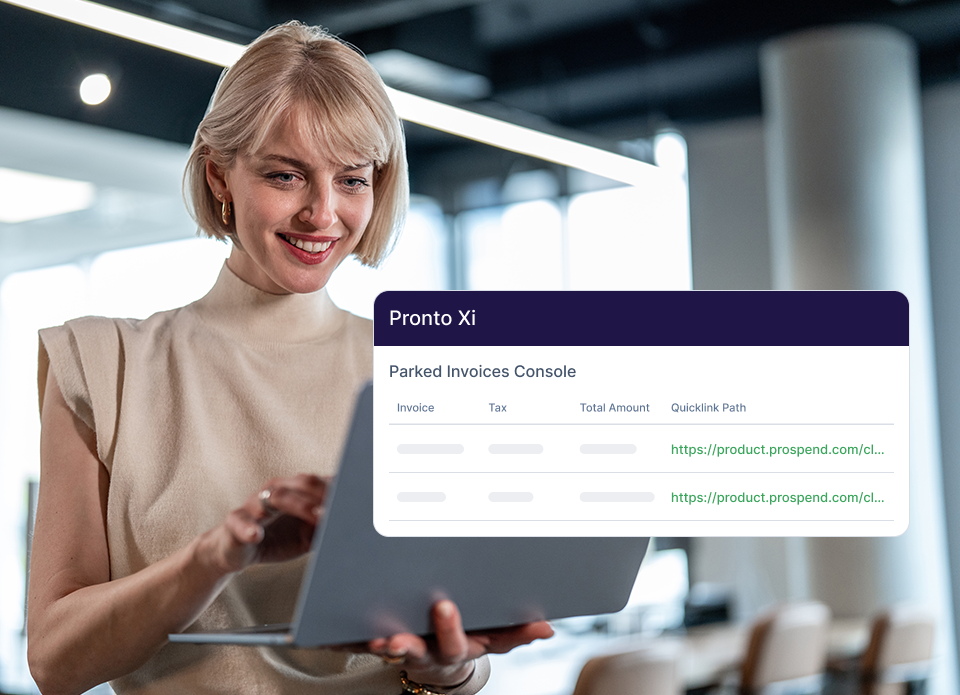
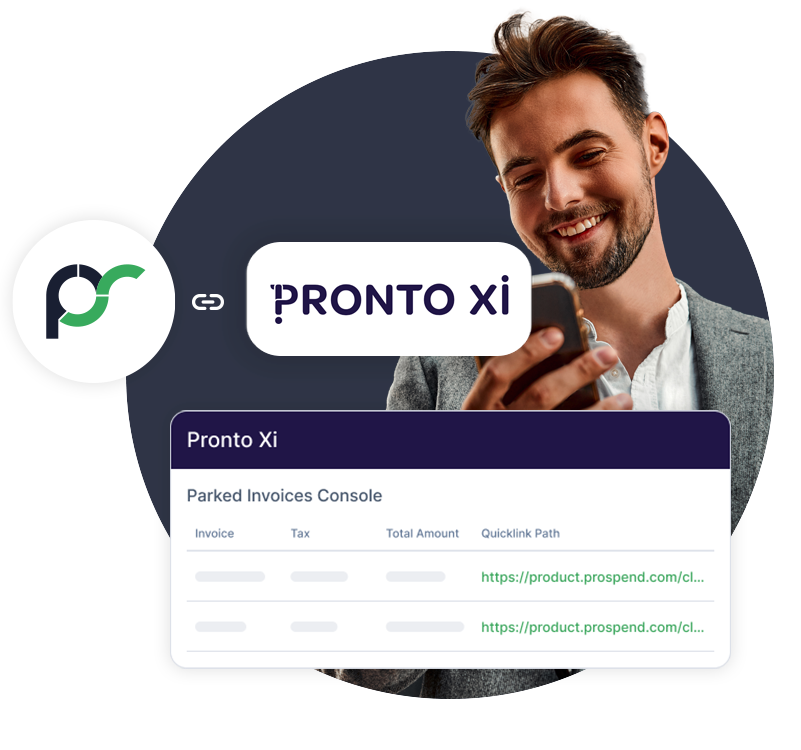
Capture, code and approve travel manager claims in ProSpend with receipts and supporting documents attached. Once approved, travel claims are exported into Pronto Xi, where they appear under Parked Invoices Console.

Keep Employee Reimbursements Inside the Finance Workflow

Employees submit out-of-pocket expenses in ProSpend with receipts and coding attached. Once reviewed and approved, cash reimbursement claims are exported into Pronto Xi, where they appear under the Parked Invoices Console.


Manage Multiple Companies in One Place

Manage spend across multiple companies or entities in one ProSpend database, with company-specific coding and approval rules. Finance teams can view spend across entities before exporting approved transactions into Pronto Xi.

Keep Every Transaction Easy to Check

Exported Pronto Xi transactions include a direct link back to ProSpend. Finance teams can open the supporting receipt, transaction details and audit history from within the Pronto Xi record.

How to Connect ProSpend to Pronto Xi

add_link_48dp_38AA5C_FILL0_wght400_GRAD0_opsz48

1. Connect 

Choose the connection method for your Pronto Xi environment. Connect through the one-click API integration for Pronto Xi version 740 and above, or configure the standard file export for earlier versions.


file_map_stack_48dp_38AA5C_FILL0_wght400_GRAD0_opsz48

2. Set up and map

Configure your GL accounts, cost centres, departments and company structure in ProSpend during implementation. Project groups and projects sync directly from Pronto Xi into ProSpend for project-related expense coding.


dashboard_2_gear_48dp_38AA5C_FILL0_wght400_GRAD0_opsz48

3. Configure

Set your approval workflows, Delegation of Authority rules, spend policies and multi-entity requirements in ProSpend. These checks run before data moves into Pronto Xi.


fact_check_48dp_38AA5C_FILL0_wght400_GRAD0_opsz48

4. Go live

Your finance team reviews and approves transactions in ProSpend. For API customers, export can be configured to trigger automatically on approval or finalisation. For earlier versions, your team exports by uploading the standard file directly into Pronto Xi.

Over 350K

Active users on ProSpend

$9.5B

Total invoice spend processed

32K

Cards managed on the platform

$144M

Expense spend tracked per month

Everything the ProSpend Pronto Xi Integration Does

ProSpendPronto_Everything the ProSpend Pronto Xi Integration Does

One-click API and file export connection

Connect to Pronto Xi through a one-click API integration for version 740 and above, with configurable auto-export on approval or finalisation. Standard file export is available for earlier versions.

Project and project group sync

Sync projects and project groups (cost categories) directly from Pronto Xi into ProSpend for project-related expense coding.

GL account configuration

Set up GL accounts (expense types) in ProSpend during implementation to match your Pronto Xi coding structure.

Cost centre configuration

Configure departments and cost centres in ProSpend to match your Pronto Xi structure.

Expense coding before export

Apply GL accounts, cost centres, departments, company and project coding in ProSpend before transactions reach Pronto Xi.

Card reconciliation

Capture, code, and approve credit card and virtual card transactions in ProSpend before export to Pronto Xi as GL journal entries.

Travel manager claim export

Capture, code and approve travel manager claims in ProSpend before export to Pronto Xi, where they appear under the Parked Invoices Console.

Cash reimbursement export

Export approved cash reimbursement claims into Pronto Xi, where they appear under the Parked Invoices Console.

Direct links back to ProSpend

Exported transactions include a direct link back to ProSpend, so finance teams can view receipts, expense details and audit history.

Multi-level approval workflows

Apply your configured approval routing and Delegation of Authority rules before transactions reach Pronto Xi.

Multi-entity management

Manage company-specific coding and approval rules in one ProSpend database, with consolidated visibility for finance teams.

Budget visibility

Track spend against budgets in ProSpend before transactions are exported into Pronto Xi.

Everything - Pronto Xi
rema-tip-top-300x185
What Pronto Customers Say

Rema Tip Top

Rema Tip Top, a global leader in repair and maintenance materials, chose ProSpend to bring staff expenses, cards and travel into one platform alongside Pronto Xi. 

“ProSpend has allowed us to totally transform our expense management process and make it paper-free while also improving our spend control with increased visibility and reporting on expenses.”

Siegmar Kahl
Head of Finance, Rema Tip Top

FAQs

Frequently Asked Questions About ProSpend’s Pronto Xi Integration

Does ProSpend integrate with Pronto Xi?

Yes. ProSpend connects with Pronto Xi to support expense management workflows, including expense claims, credit card and virtual card reconciliation, travel manager claims and cash reimbursements. 

What versions of Pronto Xi does ProSpend support?

ProSpend connects to Pronto Xi through a one-click API integration for version 740 and above. For customers on earlier versions, ProSpend generates a standard file that your team uploads directly into Pronto Xi. 

What data syncs between ProSpend and Pronto Xi?

 Projects and Cost Categories sync directly from Pronto Xi into ProSpend. GL accounts, cost centres, departments and company structures are configured in ProSpend during implementation. Approved expense and card claims are then exported into Pronto Xi through the API connection. 

Which Pronto Xi coding dimensions does ProSpend support?

 ProSpend supports GL accounts (expense types), cost centres (departments), companies, projects and project groups (cost categories). GL accounts, cost centres and company structures are configured in ProSpend during implementation. Projects and project groups sync directly from Pronto Xi. 

Where do exported transactions appear in Pronto Xi?

 Credit card and virtual card claims export to Pronto Xi as GL journal entries, visible under Batch Enquiry. Travel manager claims and cash reimbursement claims export to Pronto Xi, where they appear under Parked Invoices Console. 

Can ProSpend support multiple companies or entities for Pronto Xi users?

 Yes. ProSpend supports multi-entity and multi-company structures in one database. Your implementation team will configure the coding and approval rules required for your Pronto Xi environment. 

Can ProSpend support card reconciliation with Pronto Xi?

 Yes. Credit card and virtual card claims can be captured in ProSpend with receipts, coding and approvals attached before export to Pronto Xi as GL journal entries. 

Does ProSpend support travel manager claims for Pronto Xi?

 Yes. Travel manager claims can be captured, coded and approved in ProSpend before being exported to Pronto Xi, where they appear under Parked Invoices Console.  

Can ProSpend export employee reimbursements into Pronto Xi?

 Yes. Approved cash reimbursement claims can be exported into Pronto Xi, where they appear under Parked Invoices Console.  

Can ProSpend support expense approvals before data reaches Pronto Xi?

 Yes. Expenses and card claims can be captured, coded and routed through configured approval workflows in ProSpend before they are exported to Pronto Xi. 

Will receipts remain accessible after export?

 Yes. Exported transactions include a direct link back to ProSpend, so finance teams can open the supporting receipt, transaction details and audit history. 

Does ProSpend replace Pronto Xi?

 No. Pronto Xi remains your ERP. ProSpend manages expense capture, coding, approvals and supporting detail before finalised data reaches Pronto Xi. 

How is the Pronto Xi integration set up?

 ProSpend connects to Pronto Xi through a one-click API integration for version 740 and above. For earlier versions, ProSpend generates a standard file that your team imports into Pronto Xi. ProSpend works with your team to configure the connection method, coding structure and synchronisation settings. 

What Pronto Xi fields can be configured in ProSpend?

 During implementation, ProSpend can be configured around the Pronto Xi fields your finance team uses. GL accounts, cost centres, departments and company structures are set up in ProSpend. Projects and project groups sync directly from Pronto Xi. 

Does ProSpend handle supplier invoice processing for Pronto Xi?

 The ProSpend Pronto Xi integration covers expense management, including expense claims, credit card and virtual card reconciliation, travel manager claims and cash reimbursements. Supplier invoice automation and purchase orders are outside the scope of the ProSpend Pronto Xi integration. 

Take control of expenses before they reach Pronto Xi

See how ProSpend helps ANZ finance teams capture, code and approve expense claims, card spend, and travel manager claims before approved data reaches Pronto Xi.

pronto_cta