One Unified Platform for spend management and proactive control

Expense Manager

AP Manager

Spend Management Software for Finance Managers

No more chasing, rekeying, and month-end clean-up

Process invoices and expenses faster, keep approvals moving and give employees a simpler way to submit what finance needs. ProSpend connects AP, expenses, virtual cards and purchase orders with your ERP, helping your team reduce manual work, improve visibility and keep month-end on track.

fm_feature

role_icon_1

Less chasing

Use guided submissions and automated reminders to reduce repeated follow-up. 

role_icon_2

Faster invoice and expense processing

Capture, code and approve spend in one connected workflow.

role_icon_3

Practical adoption

Give employees and approvers simple mobile and desktop tasks.

role_icon_4

Connected to the ERP

Move approved and coded information into the existing finance environment.

What ProSpend gives Finance Managers
Take the manual work out of managing spend


Automate invoice capture and reduce manual coding

Capture invoice data and supporting documents in a structured workflow, apply configured coding and route invoices for approval. Finance can review exceptions instead of entering and checking every transaction manually.
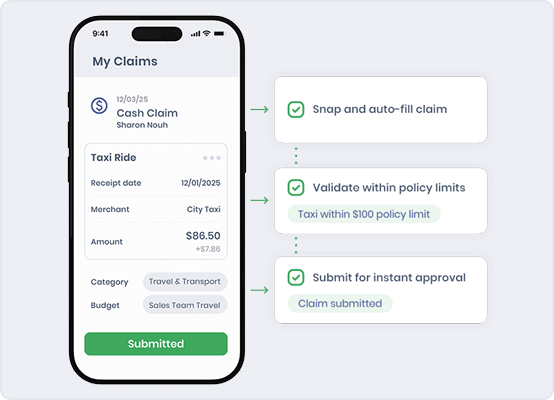
Make the right process easier to follow

Give employees a simpler way to submit receipts, claims and purchase requests with the information finance needs. Mobile capture and guided workflows reduce avoidable corrections while keeping finance oversight in place.

fm_claims_554x400px

Keep approvals moving without follow-up 

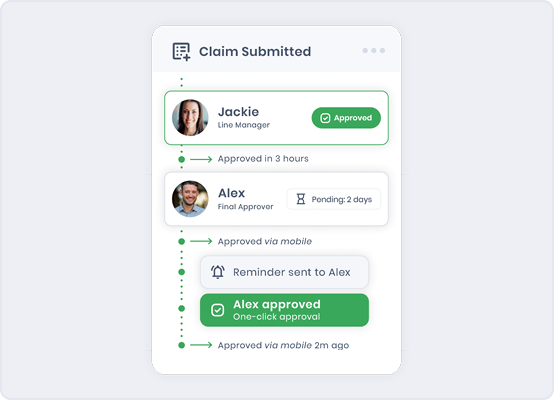
Configure approval workflows and reminders around the organisation’s structure. Finance can see what is waiting, who needs to act and where a delay is affecting payment or month-end.

fm_approvals_554x400px

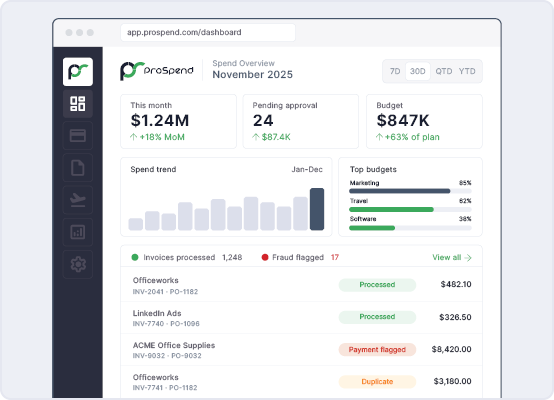
Connect expenses, invoices, virtual cards and purchase orders

Manage expenses, invoices, virtual cards and purchase orders in one unified platform instead of maintaining a separate process for each spend type. Give finance a more consistent view and reduce reconciliation between systems.

cfo_dash_554x400px

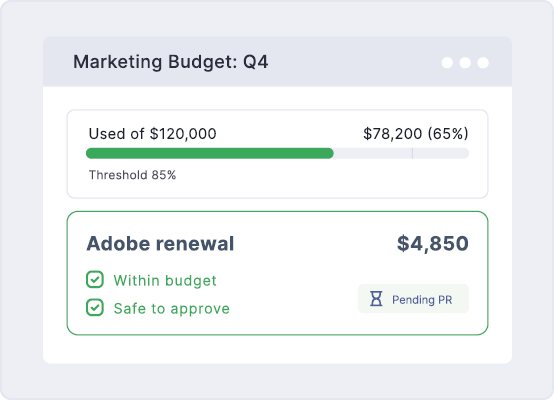
See commitments before they affect the budget

Connect budget visibility with purchase requests, purchase orders and invoice activity so finance and budget owners can see commitments earlier. This reduces reliance on separate spreadsheets and gives teams better information for day-to-day decisions.

fm_budget_554x400px

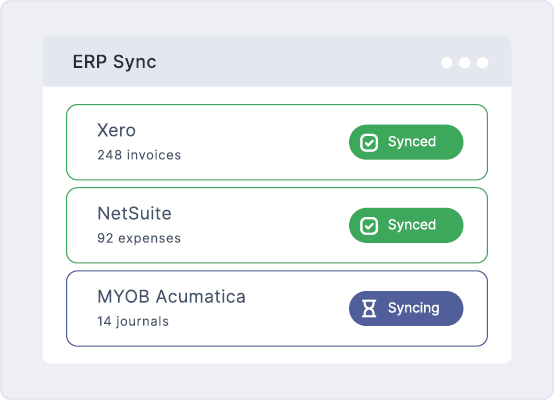
Send cleaner information to the ERP

Apply coding, entity, cost centre and tax information before approved spend reaches the ERP. Reduce repeated entry and improve the quality of information passed into the finance system.

Integration behaviour varies by ERP, so detailed data flows should be confirmed during evaluation.

fm_erp_554x400px

Implementation and support designed for your finance team

Work with an Australian implementation team to configure workflows, entities, coding and ERP integration requirements around your organisation. Support employees, approvers and finance through testing, training and go-live. 

fm_contact

See how ProSpend handles the work that needs attention

Follow an invoice or expense from submission through approval, correction and ERP handoff. See how ProSpend helps finance manage missing information, delayed approvals and rejected transactions without returning to disconnected emails and spreadsheets. 

AI Integration (1)

billini_quote

“The biggest benefit for us was the very intuitive user interface and because of this there has been no user push back.”

Billini Shoes

Read their story

friends school_quote

“ProSpend makes it easy for our staff to submit and approve invoices and claims and makes complex workflows simpler.”

The Friends’ School

Read their story

kfc_quote_1

“Manual work with expense claims has been significantly reduced, and the support we get is phenomenal.”

KFC Australia

Read their story

Built for the whole finance team

Different finance roles evaluate spend management through different priorities. Explore how ProSpend supports control, operational improvement and accounting assurance across the buying group. 

role_cfo
CFO

Proactive financial control, business impact and implementation confidence.

Learn more
role_fm
Finance Manager

Less manual work, practical adoption and smoother finance operations.

Learn more
role_fc
Financial Controller

Enforced controls, accounting accuracy and audit confidence.

Learn more

 FAQs 

What does ProSpend automate for Finance Managers?

 ProSpend can reduce manual invoice capture, coding, approval routing, reminders, expense submission and repeated data entry. Finance retains control of configuration, review, exceptions and approvals. 

How does ProSpend automate invoice processing?

 ProSpend can capture invoice information and supporting documents, apply configured coding, route invoices through approval workflows and prepare approved information for ERP handoff. Finance reviews exceptions and retains control of coding, approval and export. 

Can ProSpend show where an invoice or claim is up to?

 ProSpend provides workflow status so finance can identify what is awaiting information, coding, approval or export and who needs to act next. 

How does ProSpend make submission and approval easier for employees?

 Employees can submit expenses, receipts and other required information through mobile or desktop workflows, while managers can review and approve transactions without relying on email chains. Guided fields and automated reminders help employees complete the process correctly, while finance retains oversight of exceptions. 

Can approvals and coding rules be configured?

 Approval paths, coding and entity requirements can be configured around the organisation’s process. Detailed requirements should be mapped during discovery and implementation. 

Can employees submit expenses and receipts from their phones?

 ProSpend supports mobile expense and receipt submission, allowing employees to capture supporting information closer to the time of purchase. The exact submission fields, policies and approval path are configured around the organisation’s process. 

How does ProSpend manage virtual-card transactions?

 ProSpend brings virtual-card transactions into the same spend environment as expenses, invoices and purchase orders. Finance can apply the relevant coding, supporting documents, and approval process, with the exact card workflow depending on the organisation’s program and configuration. 

How does ProSpend integrate with our ERP?

 ProSpend supports a range of ANZ accounting and ERP systems. The data flow, fields and available automation vary by integration, so the relevant integration should be confirmed during evaluation. 

How long does implementation take?

 Implementation timing depends on modules, entities, workflows, data and integration requirements. ProSpend’s local team scopes the work and supports configuration, testing, training and go-live. 

What support is available after go-live?

ProSpend provides local support throughout implementation and after go-live. Exact support arrangements can be confirmed during evaluation.

See how much manual work you can remove from the process

Book a customised walkthrough of invoice capture, employee submission, approvals, exceptions and ERP handoff.

fm_cta